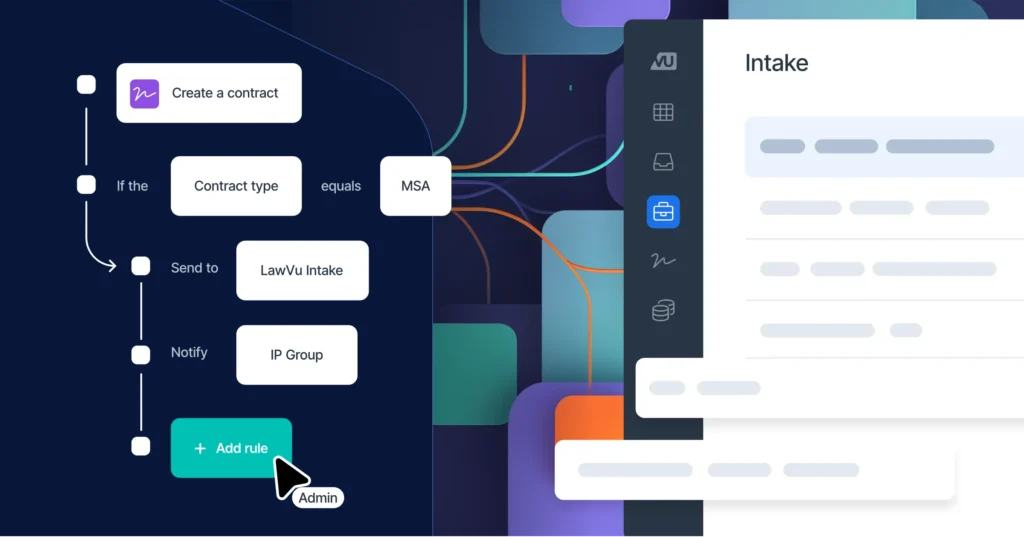
Legal intake is the process of capturing, evaluating, and routing legal requests to the right people. It starts at the ‘legal front door,’ which is how and where requests are submitted to corporate counsel, whether it’s for contract reviews, NDAs, MSAs compliance questions, or general legal advice.
Triage is what happens after a request arrives: usually sorted by the type of work, its urgency and risk, and the expertise it requires, then routed to the appropriate legal counsel.
Self-service is how the wider business can action the low-risk requests without legal’s hands-on assistance. Some use cases include: seeking approved templates, policy questions and answers, and routine NDAs the business can generate itself within guidelines set by legal.
Between them, these three shape how work reaches legal. Intake brings every request into view, triage sends each one where it belongs, and self-service handles the routine matters that never needed a lawyer in the first place.
AI makes all of this far less manual. With the help of AI, requests are interpreted, prioritized, and routed automatically, and the simple ones are answered on the spot. Better still, AI can do this inside the tools the business already uses, so the legal front door comes to them.
Most teams manage their legal intake and triage through email, a shared inbox, a spreadsheet, or a general business tool such as Jira that is approved for company use but was never built for legal. While this works when the volume of requests is low, once a team grows or the business requires more support from legal , the informal approach breaks down. Requests get missed, priorities get determined by whoever asks the loudest, and there is no visibility or insight into what is happening.
A dedicated intake and triage platform exists to solve this. For most teams it’s the first piece of legal tech they adopt, so getting it right matters: it has to support all the work legal does and grow with the business.
If your legal team or the wider business is feeling the effects of intake and triage managed across email, spreadsheets, or general-purpose ticketing tools, it’s usually a sign that your function has outgrown its current approach.
A dedicated legal intake platform benefits legal and the wider organization in several ways:
Each of these needs the same underlying structure: a defined intake path, a triage rule that matches its real urgency, and visibility once it is submitted.
Legal intake is the end-to-end process of capturing a request, evaluating it, and routing it to the right people. The legal front door is only where that process starts. Triage, including self-service and automated workflows, sits within intake rather than alongside it. Once a request is accepted, it becomes a matter, and matter management is how that matter gets worked on, tracked, and closed.
Case management is the law firm equivalent of matter management, built around billable client matters rather than internal legal work, which is why case management tools built for law firms are often a poor fit for in-house teams.
These stages don’t need to be complicated to work well. What matters is consistency with the same fields, rules, and triaging path each time. That way a request from sales in one region gets handled the same way as a similar request from finance in another.
Legal self-service sits within legal intake. It covers the requests that do not need a lawyer's judgment: generating a standard NDA, answering a common policy question, or routing a low-risk request straight to a template. The goal is to free up legal's time for the requests that genuinely need it.
Self-service works best with adequate and predetermined guardrails. That means legal sets the rules for what can be self-served, approvals stay in place for anything above a defined risk threshold, and all self-served requests are still logged and visible.
A common starting point is a standard NDA: the business fills in a short form, the system generates the agreement from an approved template, and legal only gets involved if the counterparty pushes back on a term.
In practice, this covers more ground than teams expect, reducing the volume of low-value work without handing over control. Published FAQs, policies, and approved guidance resolve most common questions without anyone in legal touching them. Routine agreements such as NDAs and MSAs are generated from approved templates through guided workflows. And when a request needs a lawyer, it arrives pre-qualified, with the right information already attached.
Standalone intake software captures requests well, then leaves them stranded. When intake, triage and self-service run in the same system as matters, contracts, spend and reporting, a request carries its context forward instead of being re-entered downstream. The reporting that comes out the other end then reflects the whole picture, not just one tool’s slice of it.
Every request lands in one system, whichever channel it came through. Routing happens automatically against rules legal has set, and the status of outstanding work stays visible to legal and the wider business alike.
Legal intake is usually the first step teams take on the way to a fully connected legal operating system, but it delivers the most value when it is connected to matter management. Intake brings order to how requests reach legal and reduces how many of them need legal at all; matter management is where accepted requests are worked on, tracked, and closed.
LawVu LegalOS brings intake, matters, contracts, spend, and AI agents into one connected operating system.
For a team just starting to evaluate options, the more useful question is rarely whether to invest in intake software at all. It is whether the option in front of them is built for how in-house legal operates day to day or adapted from something designed for a different job.
That distinction soon shows up once a team compares a few options side by side.
This page is a starting point. Depending on where you are, just getting familiar with the topic, ready to put metrics into practice, or actively evaluating software, here's where to go next.
This glossary is designed to help in-house legal teams understand the key terms and concepts that shape modern legal spend management and e-billing. Whether you’re building out legal operations, evaluating software, or refining your financial processes, these definitions offer a practical guide to the terminology you’ll encounter along the way.
The end-to-end process, starting at the legal front door, of capturing, evaluating and routing requests for legal help to the right people.
The process of prioritizing, categorizing, and routing a request after it has been submitted.
The consistent entry point the business uses to reach legal, replacing scattered email and chat requests.
Low-risk requests the business can resolve directly, within guardrails legal has set, without a lawyer handling each one individually. Covers published answers, documents generated from approved templates, and guided workflows.
The rules, permissions, approval steps, and visibility legal puts around self-service so that automation does not come at the cost of control.
The ongoing tracking and management of a piece of legal work from acceptance through to close, used by in-house teams.
The law firm equivalent of matter management, organized around billable client matters.
Any single item of work submitted to legal through the intake process, from a contract review to a policy question.
Legal intake is the process an in-house legal team uses to receive requests from the rest of the business. It covers capturing, evaluating, and routing each request, starting at a single front door, usually a form or portal, that replaces scattered email and chat messages with one consistent entry point.
Intake is the point of entry, the moment a request first reaches legal. Triage follows immediately: the request is prioritized, categorized and routed to the right person based on urgency and risk.
A legal front door is the single, consistent way the business submits requests to legal. No more emailing individual lawyers, messaging on Teams or stopping someone in the hallway. It’s the entry point that makes intake possible.
Not when it is set up with guardrails. Legal defines which request types can be self-served, sets approval thresholds for anything above a certain risk level, and keeps every self-served request logged and visible. Self-service handles the low-risk, repeatable work.
Common questions, answered from FAQs, policies, and guidance legal has published. Routine agreements such as NDAs and MSAs, generated from approved templates through guided workflows. And requests that still need a lawyer, which at least arrive pre-qualified with the right information attached. Anything above a defined risk threshold keeps its approval step, and every self-served request stays logged and visible.
Yes. Many teams start with intake alone, using it to bring structure to how requests arrive and get triaged, then add matter management later once intake is working well. It is a common way to start because it delivers a visible improvement without a full platform rollout up front.
Implementation timelines vary by scope, but LawVu's average implementation lands in under 90 days, a fraction of the time a full enterprise legal management rollout typically takes.
Intake feeds matter management. A request that comes in through intake, gets triaged, and is accepted as a piece of legal work becomes a matter. Clean intake data, captured upfront, makes matter management easier because the information legal needs is already attached when the work begins, rather than chased down after the fact.
Five stages: submission through a single front door, structured capture of the right information, triage to prioritize and route the request, assignment and tracking while the work is in progress, and consistent reporting once it closes.
LawVu's intake and triage runs as part of LegalOS, LawVu's connected operating system for in-house legal, rather than as a standalone tool. The AI Legal Front Door captures requests wherever they start, including Outlook and Gmail, Slack and Microsoft Teams messages, and Salesforce, so a request does not have to wait on someone remembering to log into a separate portal. Conditional intake forms adapt the fields shown based on earlier answers, keeping a simple request short while still capturing everything a complex one needs. Self-service handles low-risk requests within guardrails legal controls: the business can get instant answers from approved guidance and create routine agreements like NDAs and MSAs through guided workflows, with permissions, approval steps, and full visibility over what goes out. Every request stays connected to the matter, contract, and reporting data that lives elsewhere in the system. For a closer look at what this looks like in practice, see four ways LawVu's Business Portal transforms how legal and the business work together and four ways to improve legal intake.