Why simple questions are so hard for legal to answer
-
Which requests from the business are still waiting on legal?
-
What is your team working on right now, and for whom?
-
Which matters are slipping, and what will the delay cost?
These questions may sound simple, but answering them likely means pulling and reviewing data from multiple systems – wherever legal requests are captured and wherever matters are worked and tracked.
When you ask your AI agent the same questions, it can’t give you complete answers, because it doesn’t have the full context.
While it’s tempting to add another tool to your tech stack to help resolve this, a new tool only solves the step it’s bought for, rather than resolving the number of handoffs where context gets lost or the delays that occur as a result.

Where legal requests stall
Legal requests arrive from many places throughout the day: email, Slack, Teams, request forms, and quick conversations in passing. Each one competes for attention in the queue.
When requests aren’t tracked in one place, they wait to be noticed, and each handoff loses a little context, so the next person starts slower. Those small delays add up. Deadlines slip, the business waits, and routine work escalates into something more expensive. One MSA example shows how quickly this can happen:

One legal request among many
It’s a busy day, and legal is fielding requests from across the business. Among them, an account executive needs an MSA signed before a call later in the week. To be safe, they email legal, post in the legal Slack channel and fill in the request form.
-
The email lands in a shared inbox, where one person reads it.
-
The Slack message is buried in the channel by lunchtime.
-
The form submission sits in a queue that goes unassigned.
A lawyer eventually picks up the email and drafts the MSA. But the contextual records detailing why sales needed it quickly, who else saw the request, or that it was submitted three times aren't there. So by the time the MSA goes out, the call is a day away and sales has chased twice.
The request never appears in a report, and neither does the time legal spent on it.
It’s a common pattern. In IDC’s study, The Hidden Cost of Legal Friction, 49% of legal teams said scattered communications contribute most to time waste or inefficiencies.
The matter with no context
A few weeks later, the counterparty alleges a breach. The MSA becomes a dispute, and the dispute passes to a second lawyer, who opens a matter. Each step is logical, but none of the handoffs link back to the original request.
Each missing piece slows the next person down. By the time the matter is opened, the team is rebuilding context it once had, and days have gone by that can’t be accounted for.
A matter with no history is hard to staff, hard to budget and hard to explain to the business.
The incomplete AI summary
Pressed for time, the second lawyer pastes the agreement into an AI tool. It summarizes the clauses in seconds, but it can’t see three things that matter more:
- The dispute, because it wasn’t in the pasted text.
- The budget, because spend is tracked in a separate system.
- The original request, because it was buried in an inbox.
The lawyer still has to find and connect the rest by hand, which takes more time. Until they do, nobody else can see where the matter stands.
The summary is accurate and incomplete.

The four things every in-house legal team needs
The previous MSA example shows what goes missing, and how much time is lost, when legal’s work is scattered.
Here’s what changes for a legal function when its work is no longer scattered.
Total visibility.
You need a current view of every matter and the contracts and spend tied to it, without asking three individuals to reconcile each report. It should also show your team’s workload across all legal work, not just matters, so you know who has capacity and who has the expertise to take it on. That view is only accurate when legal work is recorded from the moment it arrives. If a request starts in someone’s inbox, it’s missing from every report that follows.
Foresight.
Most legal reporting describes what has already happened. For example, the contract that auto-renewed, the invoice that blew the budget, or the deadline that slipped past. Foresight means seeing those problems while there is still time to act. And it comes from tracking key dates, deadlines, and budgets as data, with alerts the team sets once, instead of relying on someone to reread each document.
An intelligent foundation.
What AI can do depends on what it can access. When matters, contracts, spend, and documents are connected, AI can summarize a matter’s full history, route a request by risk, or check an invoice against billing guidelines. When they’re not connected, each AI feature works inside a singular tool and only sees one slice of the work.
A way to get ahead.
Getting ahead means legal is consulted before the business decides, and when reporting comes from one system, you can go into a meeting with forecasted risks and workload in hand, rather than reconstructing it based on last quarter. That is how legal moves from serving the business to helping lead it.
What each need looks like in practice
Read across each row to see how one need plays out in everyday legal work, from a new request to a paid invoice.
All four depend on the same thing: legal work that stays connected from the moment it arrives.
The foundation connecting legal’s work so the business stops waiting
Every other function in the business runs on an operating system.
Sales runs on its CRM, finance on its ERP and HR on its HCM. Up to this point, legal has been the exception, stitching together email, spreadsheets, and separate tools for legal requests, matters, contracts, and spend.
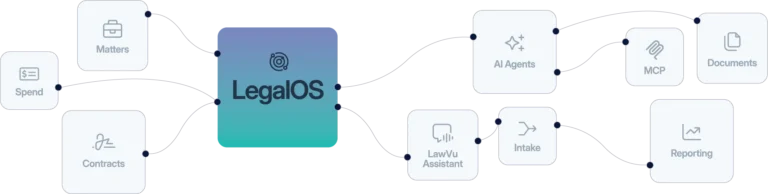
But a legal operating system changes this by bringing intake, matters, contracts, and spend together in one connected foundation.
With every request, matter, and its history in one place, AI can act with complete context, and legal gains the four things it needs most: total visibility, foresight, an intelligent foundation, and a way to get ahead.
Why AI is only as useful as what it can see
A general-purpose AI assistant is useful for drafting and research, one task at a time. But the scope of a legal function goes well beyond that: receiving requests, routing approvals, progressing matters, controlling spend, and keeping a defensible record.
AI inside a legal operating system provides legal with things a standalone tool can't:
- Context: from the request, the matter, the contract, the spend, and past decisions, so its output reflects the entire history of the work.
- Control: it works within the permissions, approvals, and audit trail applied to the legal work. Workflows can run fully automated, by exception, or with a human in the loop, depending on your risk appetite.
- Continuity: the work, the decisions, and the outcomes stay on the record, so knowledge stays with the team long after individual team members leave the business.
What changes when legal works from one system
This time let’s follow the same MSA through a legal operating system such as LawVu LegalOS. The context that slipped away at each handoff now travels with the work, from the first request through to the matter.


1. Captured and routed
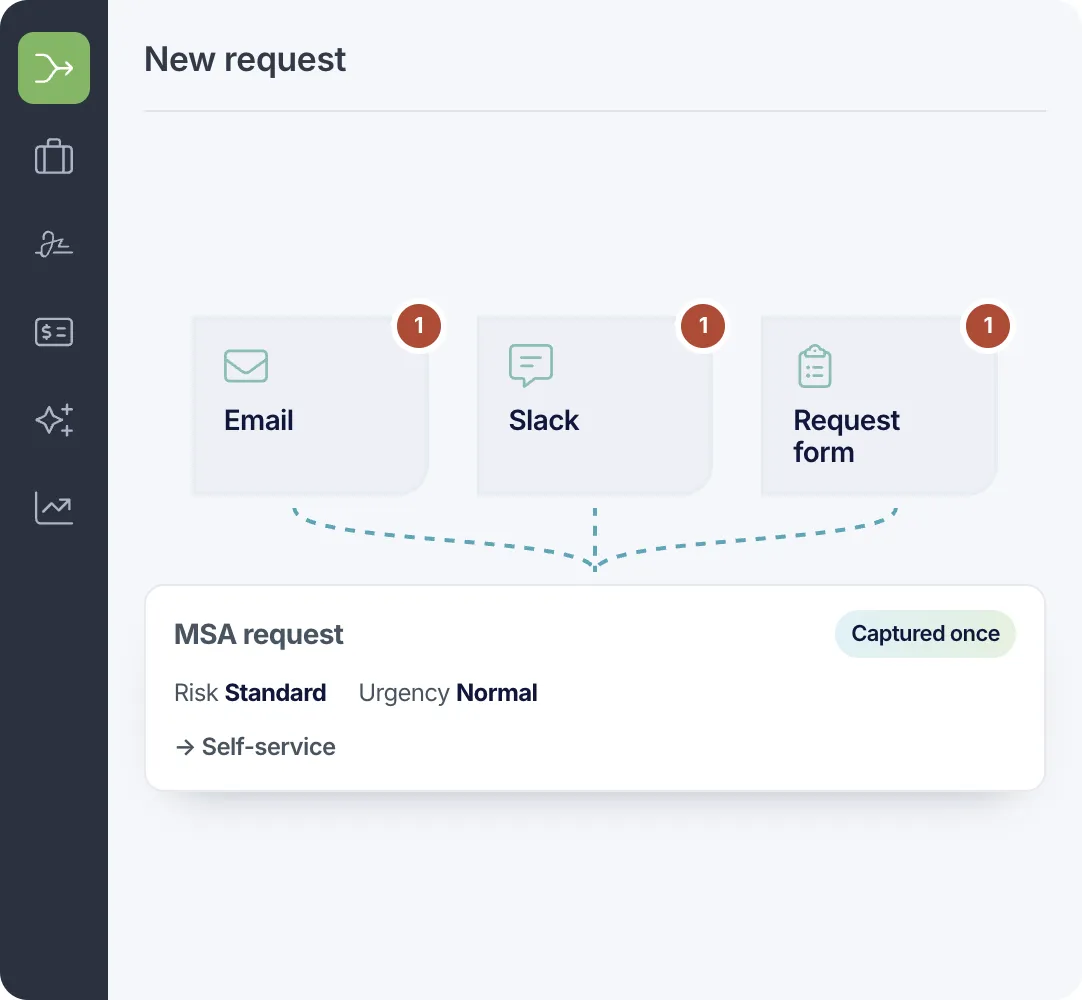
Sales submit a legal request through the same three channels. This time, all requests are captured in one intake queue with all the details required. The request is routed by risk and urgency.
A standard MSA carries little risk, so the business can create it through self-service from an approved template, and legal reviews only those with changes to the standard terms. Requests by team and type now appear in reporting, so legal demand is visible and measured as it arrives, and every request improves the data the operating system runs on.
2. Carried over
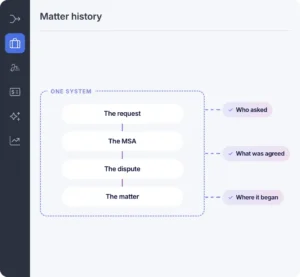
When the counterparty alleges a breach, the MSA becomes a dispute and then a matter. The request, the agreement, the matter, and the spend are worked and tracked in one system so the initial request and what was agreed and why move with the work. No one has to source the information from multiple inboxes.
3. In context
The lawyer assigned to the matter sees the dispute and spend alongside the contract. AI summaries provide them with the matter’s history in seconds, drawn from the full record rather than a pasted document.
4. Owned and tracked
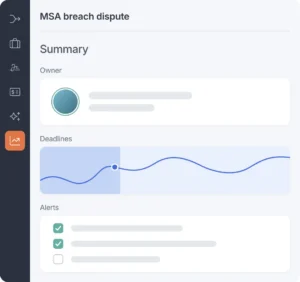
An owner is suggested based on expertise and workload. Progress, deadlines, and updates sit in one shared view, and alerts flag what’s due before it becomes urgent.
If outside counsel is engaged, they work on the same matter, and their invoices are reviewed against your billing guidelines. You can check the matter’s status and cost without asking for an update.
5. Resolved, and ready for the renewal
The dispute settles, and the business signs a commercial agreement with the same counterparty, including an auto-renewal clause. Ahead of the notice period, you’re notified.
Legal and sales review the full history in one place: the original MSA, the dispute, what it cost, and the new terms. The decision to renew, renegotiate, or exit is made on the record, rather than from memory.
Across each step, LawVu’s LegalOS captures the request, keeps its history attached, suggests an owner, summarizes the record, and flags the renewal before it’s due.
The context never leaves the system. That’s the difference between a point solution or generic AI tool that improves one step in isolation, and an operating system that improves each step legal work passes through.

From scattered to connected with LawVu LegalOS
Now that you’ve seen an MSA routed through scattered, disconnected systems, it’s clear how running intake and matters on one connected system, such as LawVu LegalOS, gives a legal team total visibility, foresight, an intelligent foundation, and a way to get ahead.
In other words, you can answer the three questions this guide opened with, without chasing anyone.LawVu LegalOS gives a legal team total visibility, foresight, an intelligent foundation, and a way to get ahead.

Self-assessment: scattered or connected?
See how much of legal’s work you can see today, and where to start.
Check each statement that’s true for your team today.
Your score: 0 of 12
9 to 12 checked: Connected.
Intake and matters already work largely as one system, which gives you total visibility and foresight. Next to address: an intelligent foundation, where AI routes, summarizes and alerts from the same record, giving you a way to get ahead.
5 to 8 checked: Connecting.
You may have visibility in one area and foresight in another, but context still slips across the areas that aren’t yet connected, and AI has no intelligent foundation to work from. Focus on connecting what you can, so each request carries through to a resolved matter.
0 to 4 checked: Scattered.
Work arrives in many places and lives in inboxes, spreadsheets, and individual memory. Context is lost at most handoffs, so total visibility isn’t possible, and foresight depends on someone remembering. Begin by establishing an entry point for legal requests: once legal requests are captured in one place, visibility follows, and foresight, an intelligent foundation, and a way to get ahead can build on it.
If you scored 8 or below
It’s time to shift from scattered to connected. Learn about LawVu LegalOS.
If you scored 9 or above
Your foundation is in place. See what AI can do on top of it.